top of page


Teamfight Tactics
User Interface Artwork, Wireframing, & Motion Graphics
January 2024 - March 2025

Working together with Riot Games as a UI/UX Artist at Demiurge Studios, I was able to be a part of various quality of life improvements and UI feature updates to Teamfight Tactics, an auto-battler spinoff game based on League of Legends!
The main feature work I assisted with was the 2024 Team Planner UI/UX Rework, in which we collaborated closely with Riot Games to improve layout design to the existing Team Planner menu within the game. Our additions involved the inclusion of saving multiple teams, implementing a fresh look to the Team Editor view to be further new-player and experienced player friendly, Champion name labeling, naming teams, as well as creating a reworked balanced layout to the existing team menu.
I additionally contributed to various other quality of life updates to TFT, such as the inclusions of the show unowned toggle, sorting, and the minimized search bar to the Mobile Loadouts and Collections menu, the creation of the Set 4.5 Revival icon, adding the Undo button to Team Planner, as well as UI polish and bug fixes.
Throughout the features I was a part of, I created wireframes, prototypes, visual design layouts, motion graphics mockups, as well as finalized UI assets and components, and additionally had hands-on experience working and implementing in Riot's proprietary editor for both PC and Mobile content.
Please feel free to take a look around below at some of the development process and areas I was a part of!
Team Planner Rework
Figma Wireframes & Prototypes
The Team Planner in Teamfight Tactics is a feature where the player can open a separate menu to plan their Teams to deploy in battle. We were tasked with designing the rework of this feature to update the menu's layout, as well as to support added features.
There were various early wireframes and prototypes created for the Team Planner rework, planning for all functionalities and layout ideations. I helped in creating user flows, interactable prototypes, and wireframes for multiple areas within the Team Planner user experience.


Vis Dev Explorations
After the base wireframes and layouts were solidified for Team Planner, we then jumped into visual design explorations! I supported areas primarily within the "Team Editor" section of the Team Planner, where the player can add or remove Champions from their team.
I was able to create various examples and explorations as options for the client, such as Champion portrait styles, border color schemes, button stylizations, and more extensively the differences between Mobile and PC platform appearances.
Throughout the development, I also needed to keep in mind the differences for the In-Game and Around Game views of Team Editor, which had slightly altered functionalities from one another (such as the "Snapshot" button not being available around game, as well as naming a team not being accessible In-Game at the time).
The final appearance for the Team Editor after many ideations can be seen in the first image!
Edge Cases
Although the Team Planner feature existed before the rework, there were many new additions we helped include that involved intricate explorations for potential edge case scenarios the player could run into.
This involved possibilities such as the player hitting max character count in a team name, what the modal would look like if the player left a team name blank, as well as various other cases to have menu states for. I again primarily supported the "Team Editor" section with edge case user flows, while closely collaborating with team members to ensure navigation was seamless across other menu areas within the Team Planner.


Multi Sets

Icon Design
One of the features that we assisted with was Multi Set tabs within Team Planner, which appear when there are multiple ongoing sets at the same time in TFT.
I helped in creating the icon used for the Set 4.5 Revival "Festival of Beasts", ultimately landing on a cloudy mountain icon referenced from prior battle pass artwork!
Loadouts
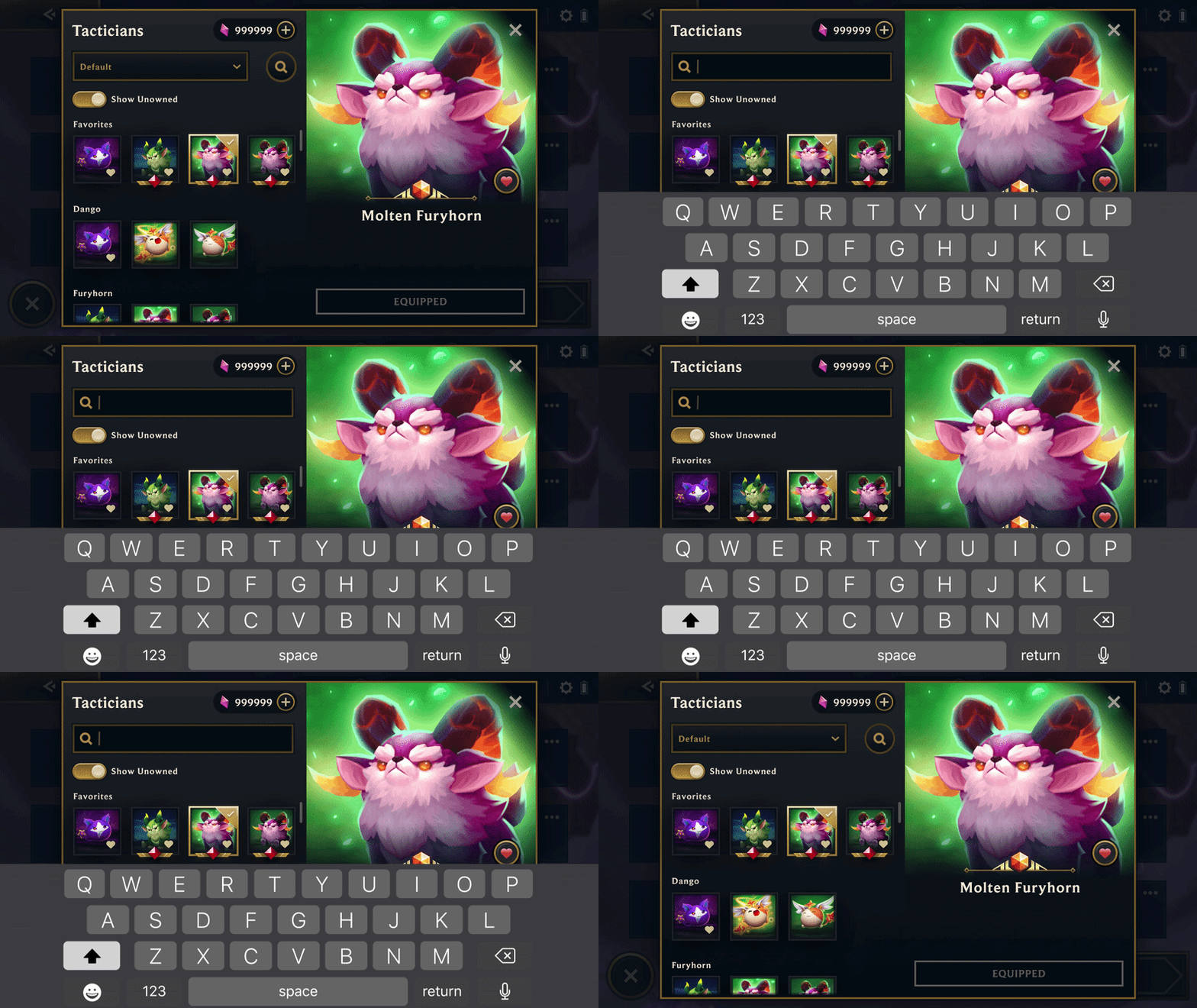
Minimized Search
The first task I helped work on in TFT was the Loadouts menu, where the player can select various customization options.
I helped create motion graphic mockups in After Effects of what a minimized search would look like in the menu, which I then helped implement into the game.
Show Unowned & Sorting Dropdown
Additionally within Loadouts, I supported the inclusion of the "Show Unowned" and Sorting dropdown tab on Mobile, both being quality of life updates for the menu.
The "Show Unowned" button allows the player to select the toggle to view unowned collectibles, or to switch it off to only show what collectibles the player already owns. I helped create user flows for the Mobile version of the toggle before implementation!
I also supported the creation of the Sorting dropdown for Mobile, a feature that allows the player to sort their collectibles by different options such as last acquired champions, or default.


bottom of page